We opened a free Mailchimp account on 17 November 2026 to check the free plan, signup forms and automations first-hand. Prices and plan limits come from Mailchimp’s published pricing page and help centre, re-checked the same day. We have not tested sending or deliverability, which is why you will find no inbox-placement data and no score. Pricing changes often, so confirm current terms on Mailchimp’s own site before buying.
Watch: Mailchimp Review in 2 Minutes

We opened a free Mailchimp account and filmed what you get: the free plan limits, the setup checklist, signup forms, the welcome-email catch, and what paid plans cost. Jump to a chapter:
- 0:00 Intro
- 0:10 The free plan
- 0:21 Inside: setup and signup forms
- 0:43 The catch: welcome emails need a paid plan
- 1:00 Price
- 1:14 Prices went up
- 1:28 Who it’s for
- 1:40 Verdict
Prefer the video with notes? See the Mailchimp video review page, with chapter summaries.
Who This Review Is For
This review is for small businesses, creators and nonprofits deciding whether Mailchimp’s free plan is enough, or what a paid plan will really cost as your list grows. If you mainly send a newsletter, compare it with MailerLite and Kit; if you run an online store, see Omnisend.
Key Takeaways
- Free plan: 250 contacts, 500 emails a month (250 a day), 1 seat, and Mailchimp branding stays on every email.
- Price climbs with your list: in the US, Essentials is $13, Standard $20 and Premium $350 a month at 0–500 contacts, and Standard reaches $60 at 2,500 contacts.
- Automation: preview only on Free (our free account asked us to upgrade to launch a welcome email), up to 4 flow steps on Essentials, up to 200 flows on Standard and Premium.
- Prices went up: ongoing rates are about 11% higher than our August 2026 capture.
- Limits: going over a limit pauses sending on Free; on paid plans, overage charges apply.
Quick Verdict
On its published numbers, Mailchimp’s Free plan is best understood as an extended trial rather than a workable long-term tier: 250 contacts is a thin starting allowance, and the 500-emails-per-month ceiling means just two newsletters to a full 250-contact list use up the whole monthly quota. Mailchimp’s own pricing page directs businesses with fewer than 500 contacts to the Free plan, and everyone else to paid tiers.
The jump to paid is where the decision actually sits. In the US, Standard starts at $20/month for up to 500 contacts, but it is priced by list size: $45 at 1,500 contacts and $60 at 2,500 — worth planning for rather than discovering later.
What We Saw Inside a Mailchimp Account
We opened a free Mailchimp account on 17 November 2026 and chose the Free plan when asked. This is what the account itself shows; we have not tested sending or inbox placement.
The Free plan limits, as the account shows them

The account overview counts both limits for you: contacts out of 250, and sends out of 500 a month, with the date the send allowance resets.
Automations are preview-only on Free
The Automations page shows a banner that says it plainly: “You are on the Free Plan. Enjoy a preview of flow templates, then upgrade to launch them.” When we opened the Welcome new contacts template, it listed what you need to run it:
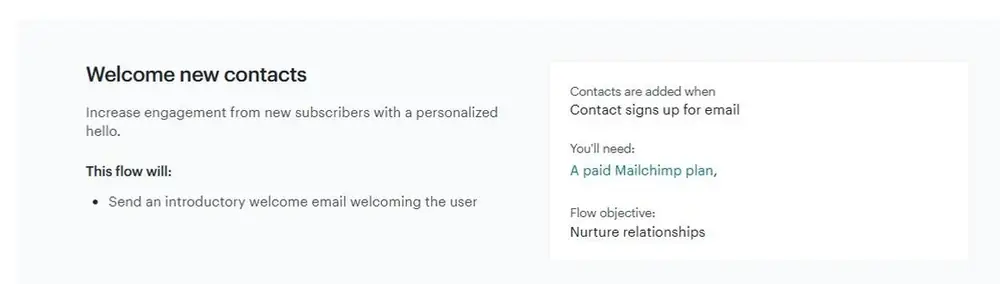
So on the free plan you can design a welcome flow, but you cannot switch it on. If an automatic welcome email matters to you, budget for Essentials or higher from the start.
Signup forms and setup
Signup forms do work on Free. Mailchimp offers a popup form, an embedded form and a hosted signup landing page, and it created a basic hosted subscribe form for us automatically. The home screen walks you through setup: add your contacts, connect an app, authenticate your domain and import your brand.
Mailchimp Pricing
Mailchimp prices on a sliding scale tied to contact count, with tiers running from 0–500 contacts up to 1,000,000+. The figures below are for the entry 0–500 contact tier in USD, checked on 17 November 2026.
These are Mailchimp’s US list prices at 0–500 contacts. Below 10,000 contacts there is no introductory discount; from 10,000 contacts, Mailchimp offers 15% off the first 12 months. Visitors in other countries may see different prices.
| Plan | US price (0–500 contacts) | Note |
|---|---|---|
| Free | $0 | 250 contacts maximum |
| Essentials | $13/mo | 3 seats |
| Standard | $20/mo | 5 seats |
| Premium | $350/mo | Priced from 10,000 contacts |
At the 0–500 contact tier, Standard includes up to 6,000 emails per month. Premium sends up to 15× your contact limit, and Mailchimp’s help centre puts its contact ceiling at 200,000 before pricing becomes custom.
One difference between Free and the paid tiers is worth knowing before you pick. On paid plans, Mailchimp’s page states that overage charges apply if you exceed your contact or send limit. On the Free plan, it states that sending is paused instead. Free fails closed; paid plans fail expensive.
Mailchimp Pricing by List Size (USD, Monthly Billing)
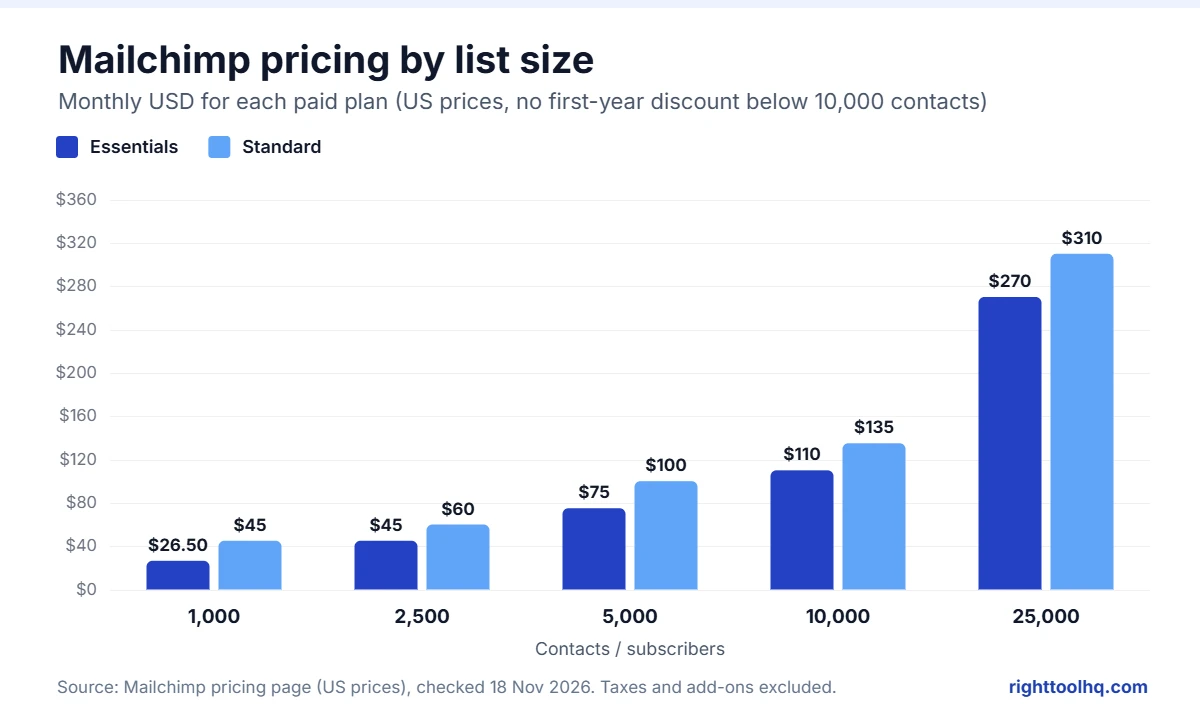
These are Mailchimp’s US monthly list prices, as shown on its pricing page on 18 November 2026. At 10,000+ contacts, Mailchimp takes 15% off the first 12 months.
| Contacts | Essentials | Standard | Premium |
|---|---|---|---|
| 0–500 | $13 | $20 | $350 |
| 501–1,500 | $26.50 | $45 | $350 |
| 1,501–2,500 | $45 | $60 | $350 |
| 2,501–5,000 | $75 | $100 | $350 |
| 5,001–10,000 | $110 | $135 | $350 |
| 10,001–15,000 | $180 | $230 | $465 |
| 15,001–20,000 | $230 | $285 | $535 |
| 20,001–25,000 | $270 | $310 | $620 |
| 25,001–30,000 | $300 | $340 | $685 |
| 30,001–40,000 | $340 | $410 | $750 |
| 40,001–50,000 | $385 | $450 | $815 |
| 50,001–75,000 | — | $630 | $900 |
| 75,001–100,000 | — | $800 | $1,025 |
Essentials stops at 50,000 contacts and Standard at 100,000.
What Changed in Mailchimp’s Pricing in 2026
Mailchimp has changed its prices and limits more than once. This is what we can confirm from our own dated captures of its pricing page:
- Prices vary by country. Mailchimp’s pricing page shows local prices based on where you open it. Our earlier figures were captured from outside the US and were lower; this review now uses US prices in USD.
- The Free plan is smaller. It now covers 250 contacts and 500 sends a month. It used to allow 500 contacts; the cut was reported in early 2026, but Mailchimp’s own pages give no date for it.
- New name for automations. In June 2025 Mailchimp renamed its Customer Journey Builder to Marketing Automation Flows, so older guides use the old name.
- Large-list offer. At 10,000+ contacts, Mailchimp offers 15% off the first 12 months on paid plans.
Discounts and Prices by Country
Mailchimp’s US pricing page offers one introductory deal: 15% off the first 12 months for lists of 10,000+ contacts. Below that, you pay the list price from day one. Outside the US the page can show quite different figures: from India, for example, we saw prices about a third lower, with 50% off the first year. Check the page from your own country before you budget, and treat this guide as the US baseline. We look at how Mailchimp presents its prices, next to six other email platforms, in our pricing-page audit.
What the Free Plan Actually Includes
Per Mailchimp’s plan comparison, the Free tier includes 1 seat, 1 audience, and a monthly send cap of 500 emails or 250 per day, whichever is reached first.
Several features common on competitors’ free tiers are excluded. Marketing automation flows are listed as “Not included” in the key plan features for Free (the detailed comparison calls them a “free preview”). Email scheduling is “Not included.” Mailchimp branding cannot be removed. Pre-built email templates are marked “Limited” rather than fully included, and custom-coded templates can be created but require an upgrade to send. Role-based access is unavailable, and customer support is limited to email for the first 30 days only.
One notable inclusion: Mailchimp lists 300+ integrations and popup forms as available on every tier including Free.
How to Set Up a Welcome Email in Mailchimp
A welcome email is the first automation most people build. In our free account, Mailchimp let us preview the welcome template but said “You’ll need: A paid Mailchimp plan” to launch it, so plan on Essentials or higher; a welcome email uses one of Essentials’ four flow steps. These steps come from Mailchimp’s own help centre, checked 17 November 2026:
- Click the Automations icon in the left menu.
- Click Build from scratch, or pick a welcome template from the flow templates.
- Name the flow and choose the audience it should run on.
- Click Choose a trigger and pick Signs up for Email. Decide whether imported contacts should get the email too.
- Optional: click Filter who can enter this flow to limit it to certain contacts.
- Click Save Trigger, add your email step and write the message.
- Click Continue, then Turn flow on.
Before you switch it on, set up domain authentication in Mailchimp so your welcome email is less likely to land in spam. Source: Mailchimp help: create a Marketing Automation Flow.
Plan Comparison
All values below are as published on Mailchimp’s plan comparison, accessed 17 November 2026.
| Feature | Free | Essentials | Standard | Premium |
|---|---|---|---|---|
| Monthly email sends | Max 500/mo or 250/day | 10× contacts | 12× contacts | 15× contacts |
| Seats | 1 | 3 | 5 | Unlimited |
| Audiences | 1 | 3 | 5 | Unlimited |
| Role-based access | Not included | 2 roles | 4 roles | 5 roles |
| Marketing automation flows | Not included | Up to 4 flow steps | Up to 200 flows | Up to 200 flows |
| Generative AI features | Not included | Not included | No-cost add-on | No-cost add-on |
| Custom-coded templates | Create — upgrade to send | Create — upgrade to send | Create and send | Create and send |
| Email scheduling | Not included | Included | Included | Included |
| Remove Mailchimp branding | Not included | Included | Included | Included |
| Branded templates | Not included | Not included | Included | Included |
| Custom reports | Not included | Not included | Included | Included |
| Dynamic content | Not included | Not included | Included | Included |
| Pre-built templates | Limited | Included | Included | Included |
| Popup forms | Included | Included | Included | Included |
| 300+ integrations | Included | Included | Included | Included |
| Customer support | Email, first 30 days | 24/7 email & chat | 24/7 email & chat | Phone & priority |
| Personalized onboarding | Not included | Not included | 1 session | 4 sessions |
| Dedicated onboarding specialist | Not included | Not included | Not included | Included |
| Premium migration services | Not included | Not included | Not included | Contact sales |
Mailchimp Pros
- 300+ integrations and popup forms on every plan, including Free.
- Up to 200 automation flows on Standard and Premium.
- Generative AI features at no extra cost on Standard and Premium.
- 24/7 email and chat support on every paid plan.
- 15% nonprofit discount, plus a Pay As You Go option for people who send rarely.
Mailchimp Cons
- Small free plan: 250 contacts, 500 sends a month, and Mailchimp branding stays.
- Prices rise quickly with list size: Standard triples between 500 and 2,500 contacts.
- Ongoing prices rose about 11% in the second half of 2026.
- Essentials automation stops at 4 flow steps, with no branching.
- Free-plan support ends after 30 days.
Who Should Consider Mailchimp
Based on the published feature split and our free-account check:
Small teams needing multiple seats. Standard’s 5 seats and 4 roles, and Premium’s unlimited seats, are aimed at teams where more than one person touches campaigns. Free’s single seat rules out shared workflows entirely.
Businesses wanting automation without a separate tool. Automation flows are absent on Free and capped at 4 flow steps on Essentials, but Standard and Premium both list up to 200 flows.
Anyone already using tools in Mailchimp’s integration directory. 300+ integrations are included on every tier, including Free — unusual, since integration access is often gated behind paid plans elsewhere.
Who Should Look Elsewhere
Anyone planning to send regularly on a free plan. The 500-emails-per-month ceiling bites fast: two sends to a full 250-contact list use it up.
Solo creators who need automation on a budget. Automation is unavailable on Free and limited to 4 flow steps on Essentials.
Anyone who needs white-labelled email immediately. Mailchimp branding cannot be removed on the Free tier.
Buyers optimising purely on entry price. Standard starts at $20 a month in the US, more than MailerLite Comfort at $12 for the same 500 contacts. Compare against competitors’ standard rates, not their promotional ones.
Support by Tier
Support is one of the clearer tier differentiators on Mailchimp’s published comparison. Free includes email support for the first 30 days only. Essentials and Standard both list 24/7 email and chat support. Premium adds phone and priority support, four personalized onboarding sessions, and a dedicated onboarding specialist; Standard includes one onboarding session.
Mailchimp’s Own Marketing Claims
Two claims appear prominently in Mailchimp’s pricing materials, both carrying vendor-defined methodology in the page’s own disclaimers. We reproduce them as positioning rather than as independently verified fact.
Mailchimp describes itself as the “#1 email marketing and automation platform,” which its disclaimer bases on “December 2023 publicly available data on competitors’ number of customers.” That is a customer-count basis, and the underlying data is now more than two years old.
Mailchimp also cites a “27X ROI” figure for Standard plan users, which its disclaimer attributes to e-commerce revenue from Standard users’ campaigns between 1 December 2024 and 30 November 2025. This is vendor-attributed to its own users’ results, not an independent study, and is not a return any individual account should expect.
Alternatives
For six options side by side, see our guide to Mailchimp alternatives. We’ve also published head-to-head comparisons: MailerLite vs Mailchimp, Brevo vs Mailchimp (send-based billing against contact-based), Omnisend vs Mailchimp (ecommerce-native against general-purpose), Kit vs Mailchimp and ActiveCampaign vs Mailchimp. The individual MailerLite, Brevo, Omnisend and Kit and ActiveCampaign reviews cover each one’s free-tier limits and entry pricing in full.
What Each Plan Actually Limits
Mailchimp’s help documentation sets out limits its pricing page does not. Your monthly send allowance is a multiple of your contact limit, and the multiple rises with the plan: Essentials sends 10× your contact limit, Standard 12×, Premium 15×. Contact ceilings differ too — Essentials stops at 50,000 contacts, Standard at 100,000, Premium at 200,000, above which pricing is custom.
| Plan | Audiences | Seats | Send limit | Max contacts |
|---|---|---|---|---|
| Free | 1 | 1 | 500/month, 250/day | 250 |
| Essentials | 3 | 3 | 10× contact limit | 50,000 |
| Standard | 5 | 5 | 12× contact limit | 100,000 |
| Premium | Unlimited | Unlimited | 15× contact limit | 200,000 |
Two limits are worth knowing before you start. Automation flows on Essentials are capped at four steps, which is where most welcome sequences with branching stop. And if you exceed 250 contacts on the Free plan, Mailchimp places a hold on sending — live emails and test emails alike — until you upgrade or reduce your contact total. You can keep building and importing; you just cannot send.
One thing to watch when checking prices yourself: Mailchimp’s pricing page shows local prices based on your location. Opening it from outside the US may show lower or higher figures, and adding ?currency=USD only converts your local price to dollars; it does not show the US price. The prices in this review are US prices.
Mailchimp FAQ
Is Mailchimp free, and what does the free plan include?
Yes. Mailchimp’s Free plan covers up to 250 contacts and includes 1 seat, 1 audience, popup forms and 300+ integrations. Sending is capped at 500 emails per month or 250 per day. Email scheduling and branding removal are not included, and automation flows are listed as not included in Mailchimp’s key plan features. Checked 17 November 2026.
How much does Mailchimp cost per month?
At 0–500 contacts in the US, Mailchimp charges $13/month for Essentials, $20/month for Standard and $350/month for Premium (Premium is priced from 10,000 contacts). Prices rise with your contact count: at 5,001–10,000 contacts, Essentials is $110 and Standard $135 a month. Prices differ by country.
How many emails can you send on Mailchimp’s free plan?
Mailchimp’s plan comparison caps the Free plan at 500 emails per month, or 250 per day. With a full 250-contact list, that is two sends to everyone per month.
Does Mailchimp’s free plan include automation?
Not in a usable way. In our free account (17 November 2026), Mailchimp let us preview flow templates but asked us to upgrade to launch them, and the welcome template says “You’ll need: A paid Mailchimp plan.” Essentials allows up to 4 flow steps, and Standard and Premium list up to 200 flows.
Can you remove Mailchimp branding from emails?
Not on the Free plan. Mailchimp lists “Remove Mailchimp branding” as not included at that tier. It is included on Essentials, Standard and Premium.
What is the difference between Mailchimp’s Standard and Premium plans?
Per Mailchimp’s comparison, Premium adds unlimited seats and audiences (Standard has 5 each), 5 roles versus 4, phone and priority support versus 24/7 email and chat, four onboarding sessions versus one, a dedicated onboarding specialist and premium migration services. Monthly sends scale at 15× contacts on Premium versus 12× on Standard.
Does Mailchimp offer a first-year discount?
Only for larger lists. On 18 November 2026, Mailchimp’s US pricing page offered 15% off the first 12 months for accounts with 10,000+ contacts; below that, the list price applies from day one. Some countries see different offers.
What happens if you go over Mailchimp’s limits?
On the Free plan, Mailchimp pauses sending, including test emails, until you upgrade or reduce your contacts. On paid plans, overage charges apply when you exceed your contact or send limit.
How many contacts can each Mailchimp plan hold?
Free holds 250 contacts. Mailchimp’s help centre puts the ceilings at 50,000 contacts for Essentials, 100,000 for Standard and 200,000 for Premium. Above that, pricing is custom.
Does Mailchimp have a nonprofit discount or a pay-as-you-go option?
Yes to both. Mailchimp offers nonprofits and charities 15% off; you request it from its billing team after signing up. It also sells email credits on a Pay As You Go plan, which suits people who send rarely.
Final Verdict
On documented facts: Mailchimp’s paid tiers are feature-dense — automation flows, generative AI at no extra cost on Standard and above, unlimited seats on Premium, and integrations included at every level. The Free plan is small: 250 contacts and 500 sends a month, with Mailchimp branding on every email.
Not covered here: how the campaign builder, automation editor, and deliverability actually perform in practice. We opened a free account to check the plan limits, signup forms and automations, but we have not tested sending or deliverability, so nothing here is a claim about inbox placement.
Best fit, on paper: a small team that needs multiple seats and real automation, and is budgeting for Standard at $20 a month, and more as the list grows.
How this vendor presents its prices, set against six competitors captured the same day, is covered in our pricing-page audit.
Disclosure
RightToolHQ has no affiliate relationship with Mailchimp at the time of writing, and this page contains no affiliate links. If that changes, this notice will be updated and any affiliate link will be clearly disclosed. Our editorial policy and affiliate disclosure explain how we handle this.